
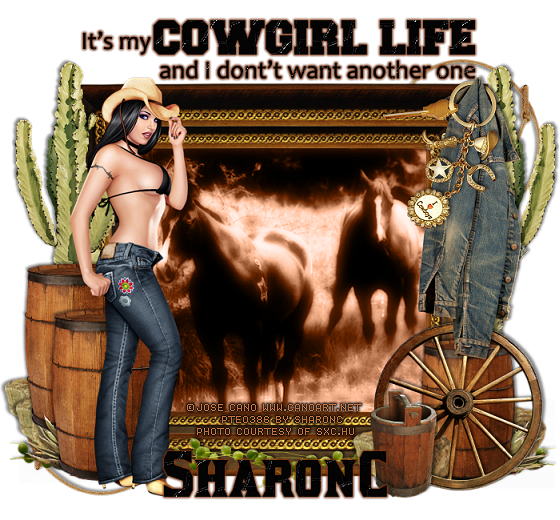
This tut was written for those with a basic knowledge of psp.
I am using the awesome artwork of Jose Cano. You need a license to use this art work. Please do not use without a license.
He use to sell at PTE when I bought my tube, which has closed now.
You can find his art at his store HERE
Scrap kit used is by Mediterranka Design called Cowgirl's Life, and you can get it at her blog HERE
Font I used was Kirsty and you can get it HERE
Supplies Needed
I used PSPX...but any of them should work.
Drop Shadow V2 H2 50 5
Filters used
xero filters-Radiance, porcelain and mistifier
xenofex 1.0 Baked Earth-Optional
EyeCandy 4000-Gradient Glow
Drop shadow is usually 2V 2H 50 5 Depending on where you want your shadow sometimes you might have to do the minus on them.
Ok Let's get started
Open a 700 x 700 image, can alway resize later.
Open the frame with the gold and resize it to 30%, copy and paste, then go back and undo resize on original frame, now resize to 35% and paste on top of the other frame, merge down. Take your magic wand click inside, go to selections, expand and expand by 2, add a new raster layer and fill with a color of choice, I used #86441f, move below your frame, copy and paste your image of choice, I used one from sxc.hu, then invert and delete, select none.
Duplicate your image now, on the original add xero radiance and porcelain and change the blend mode to luminance (L). Go to the top image and change the blend mode to overlay. Apply xero porcelain to that one twice, then merge down and apply mistifier. All at default settings. Resize the branch to 25% place on frame and duplicate mirror and adjust...merge the 2 branches, add your drop shadow.
Resize the barrel to 15% place to the left on frame duplicate and adjust to your liking. Duplicate again to 85% and move to the right, resize the water bucket to 15% and place to the left of the barrel a bit...refer to my tag for placement....Resize the denim jacket to 25% and put it in the right hand corner like it is hanging on the frame. Resize the wheel to 15% place above the barrel but below the water bucket...resize the keyring and hang above the jacket but erase some of the loop to make it look like it is hanging over it also. Resize cactus to 25% and place one behind the jacket and barrel on the right and then duplicate mirror and place behind the barrels on the left...remember to add your drop shadows as you go along. Add your tube and place above the barrels on the left and add your drop shadow. Resize your lasso rope and place on bottom layer and mirror and place just at your tubes feet....duplicate flip and mirror. You might decide to add more elements, let your creativity flow....
Word art I used I resize to 15%, then added baked earth xenofex1.0, this is optional. Added a gradient glow, medium with color #732f0e, add your name and do the same as you did with the wordart...Now close off your white background if you had one and merge visible....resize....I resize to 80% and then sharpen...now add your copyright info.
That's it, hope you enjoyed doing my tut
Hugs SharonC

No comments:
Post a Comment